

Please note that the screenshots and videos provided with our release notes are currently only available in german. We are actively working to expand language options for these visuals. We apologize for any inconvenience and appreciate your understanding.
E·R·Plus 2023.1 Build 9533 September 2024 (SP10)
Important: The certificate for the installation of the E·R·Plus Windows (UWP) apps has been updated with this version.
E·R·Plus 2023.1 Build 9532 August 2024 (SP9)
Important: The SSL certificate of the E·R·Plus server has been replaced with this version.
E·R·Plus desktop application
General
- Minor program behavior adjustments
E·R·Plus 2023.1 Build 9531 July 2024 (SP8)
E·R·Plus desktop application
General
- Minor program behavior adjustments
E·R·Plus 2023.1 Build 9527 June 2024 (SP7)
E·R·Plus desktop application
SchüCal interface
- Release of the SchüCal version 2024 R1
ZUGFeRD interface
- The ZUGFeRD V2/XRechnung export has been extended to fulfil the XRechnung 3.0.1 standard.
With the new standard, the requirement to specify the invoice address of the buyer/invoice recipient in the invoice became effective.- Electronic address of the buyer
“Invoice dispatch e-mail” from the contact is used as the electronic address of the buyer.
If this field in is not filled in, a corresponding warning is shown. - Electronic address of the seller
The field “Invoice dispatch e-mail” has been added to the company information for the electronic address of the seller.
If this field is not filled in, a corresponding warning is issued.
The database update sets the “normal” e-mail address from the company information as the default value for this field once.
- Electronic address of the buyer
E·R·Plus 2023.1 Build 9526 March 2024 (SP6.2)
E·R·Plus desktop application
Settings
- In the general settings, the option “Do not add a “VAT correction” deduction for different tax rates” has been added, which can be activated separately for incoming invoices under “Incoming invoices” and for outgoing invoices under “Invoices”.
- Outgoing invoices
If the option is activated, the invoice deduction “Correction VAT” does not have to be added if the tax rate differs from the tax rates of the previous partial invoices. However, the correction value can be added optionally and adjusted if necessary. - Incoming invoices
If the option is activated, a VAT correction is no longer added if there are different tax rates in the previous partial invoices. It is not possible to manually add an optional correction value.
- Outgoing invoices
E·R·Plus 2023.1 Build 9525 February 2024 (SP6.1)
E·R·Plus desktop application
Incoming invoices
- In order to be able to map different tax rates when entering incoming invoices which may result from the increase in Swiss VAT from 2024, the following adjustment has been made:
Different input tax rates can be used when entering cumulative incoming invoices for service orders. It should be noted that several tax rates cannot be used within one invoice, but only one tax rate per invoice. When entering an invoice with a different tax rate, an additional item has to be entered which is given the corresponding tax rate. As soon as there are different tax rates in the cumulative invoices, a “VAT correction” deduction is automatically included in the final invoice.
Please note that the gross invoice total, which has been calculated taking the VAT correction into account, will not be considered when creating the posting record and entering the outgoing payment. The corresponding values must be updated manually.
E·R·Plus 2023.1 Build 9523 February 2024 (SP6)
E·R·Plus desktop application
LogiKal interface
- When importing parts lists from a LogiKal file, the option “incl. hardware colours” has been added for accessories.
E·R·Plus 2023.1 Build 9522 January 2024 (SP5)
E·R·Plus desktop application
Task management
- When a new task is created for another user, an e-mail notification is now sent to this user. Please note that the user must have entered a valid e-mail address in the user management.
Final costing
- The final costing can be compiled across projects and limited to work orders.
Personnel administration
- The vCard export has been added to the Search/filter form, which can be used to export a digital business card.
E·R·Plus 2023.1 Build 9521 November 2023 (SP4.1)
Please note: It might be necessary to restart the server before installing the server update.
General
- Minor program behavior adjustments
E·R·Plus 2023.1 Build 9520 November 2023 (SP4)
Please note: It might be necessary to restart the server before installing the server update.
E·R·Plus desktop application
Outgoing invoices
- The visibility of the expander “Record receipt of payment” has been adjusted.
If a following invoice with invoice approval of type partial payment, stage payment or final invoice already exists for the opened partial invoice, the expander “Record receipt of payment” is displayed. The checkbox “Receipt of payment concluded” can therefore also be set if the ARE to be processed has no incoming payment.
Please note that the values shown only relate to the current invoice. Incoming payments for subsequent invoices are not taken into account here. - ZUGFeRD-V2 export
The item description is now written to the <Name> element in the invoice item (IncludedSupplyChainTradeLineItem).
Outgoing invoices
- Service orders can contain items with different positing accounts.
Settings
- The option “Apply cost sepcifications in positing records as cost centres or the business transactions” can be set seperately for incoming and outcoming invoices.
Machine management
- In the search/filter form of the machine management, the column “IssuedOn” has been added, which shows the last issue date of the respective device.
The column can be displayed optionally.
Inventory
- Items with the storage method “halfopen” can be counted in the permanent inventory.
Material status
- When expanding the outgoing goods information, the information “Note” and “Staging location” is available. The corresponding columns can optionally be displayed.
SchüCal interface
- Release of SchüCal version 2023 R3
- The following discount groups are now imported when importing article data:
“SC 225” Name: Window sill profiles
“SC 226” Name: Window sill accessories
Correspondence
- The Correspondence module has been activated for the E-R-Plus “SE-advanced” edition.
Goods notices
- Due to an adjustment to display the date “Created on”, we recommend resetting the layout in Search/filter goods notices.
- The “Staging location” field has been added to the “Internal information” area. The field is only available in packing lists and material delivery notes. In Search/filter goods notices, the “Staging location” column can be displayed in the “Goods notices” and “Goods notice items” detail tabs.
ZUGFeRD interface
- The invoice number for partial invoices that are imported for service orders can be supported for ZUGFeRD invoices.
The number is transferred as <IncludedNote> in the <ExchangedDocument> element. Details on this can be found in the linked wiki article.
ERPlusServer
- A parameter for the year, e.g. “-2024”, can be added to the “Transfer leave” server job in order to transfer the leave entitlement from the previous year for the year 2024.
Reporting
Updating the standard reports
As part of the maintenance work, the following functionalities have been added in addition to various layout adjustments and the revision of display conditions:
Rptconfig.xml
- Outgoing invoices, orders and order confirmations
Content such as payment plan, information section and payment terms have been given new configuration options for fonts. Fixed font sizes have been replaced. - Service order (mobile version)
The areas for personnel costs, material costs and travel costs have received individual configuration entries to switch their display on or off.
Profit calculation
- Has been removed from the area for service orders and added in the report center under the new category for service orders.
Complaint
- If no project number has been entered in complaint records, this is now taken from the associated order.
Correspondence
- The options “Print with letterhead” and “Print as COPY” have been added.
E·R·Plus Apps (Build 9849)
General
- Support for Android version 14
MaWi-App
- The inventory count list details are now saved offline as soon as they are entered. Synchronization is started automatically as soon as the count list is exited. In addition, both when displaying the inventory count lists and when navigating back to the start page, the system checks whether there are any local changes. If this is the case, the data gets synchronized automatically. This is to ensure that no data is lost if the end device is unable to establish a connection to the server.
Please note that the synchronize button on the start page has been removed.
TimeAppV2
- Personnel bookings with the setting “Rounding of order times” in the working time model:
If the break is ended with the start of an order booking, the start time of the order is now taken over unrounded.
E·R·Plus 2023.1 Build 9515 October 2023 (SP3)
E·R·Plus Desktop Application
Settings
- In the invoice settings (template for invoice creation), the descriptions for the invoice deductions can be edited.
Please note the input of max. 100 letters. In addition, the user right “Settings” with at least Read+Write is required.
SchüCal interface
- For the calculation and parts list import from SchüCal, sun shading systems of the “Integralmaster” type are taken into account.
The import is largely analogous to the import of other sun shading systems such as CTB or CCB. During the calculation import, the sunshades are always taken over as 0-articles. In the case of parts list import also with the article number as long this is available in the article master data in E·R·Plus.
Good notices
- Due to an adjustment to the filtering for material requirement numbers in Search/filter goods notices, it is recommended to reset the layout.
Factory orders
- Automatic update of material status in the material requirement tab has been disabled.
Please note that the form should be updated manually if it is open for a longer period of time.
Reporting
Updating the standard reports
As part of the maintenance work, the following functionalities have been added in addition to various layout adjustments and the revision of display conditions:
New Standard Report “Supplier evaluation”
- The new standard report “Supplier evaluation” has been added to the report centre. It is used to evaluate all suppliers from which orders were placed within a selected period. The period can be selected by the parameter reference year and includes the reference year and its previous year.
Offers and order confirmations
- Item-related, negative discounts are displayed with a minus sign.
Offers and order confirmations with wage costs (Austrian version)
- Wage costs and other costs can be displayed either per unit or as a total figure using the print option “Total wage costs”.
Article data sheet
- The display of technical information has been added.
Outgoing invoices
- Blanks have been removed from IBANs in QR codes.
Orders
- The print option “foreign currency” has been added.
Incoming delivery notes
- Data from surface purchase orders are displayed.
Works in progress / Key project data
- Information on final invoices and partial final invoices available in projects has been added.
Correspondance
- “Your reference” is displayed in the subject line.
Project data sheet
- Comments 1 to 6 from the project management are displayed.
Factory orders
- The display of the coater has been added.
E·R·Plus Apps (Build 9760)
TimeAppV2
- Payroll reports:
The service order selection works like the selection of a project, where a search term must first be entered before service orders are loaded in the selection list.
E·R·Plus 2023.1 Build 9513 September 2023 (SP2)
E·R·Plus Desktop Application
Order confirmation
- In the display form, the selection field for the order confirmation to be displayed can now be sorted by date or OC number.
The selected sorting is saved on a user-related basis and applied again the next time the form is opened.
Outgoing Invoices
- Column “recipient account ” can optionally be shown in search/filter outgoing invoices.
Delivery note for order
- In the display form, the selection field for the delivery note to be displayed can now be sorted by date or delivery note number.
The selected sorting is saved on a user-related basis and applied again the next time the form is opened.
LogiKal interface
- Fittings can be imported from LogiKal without a surface. For this purpose, the checkbox “incl. fitting colour” has been added to the parts list import from LogiKal, which extends the option “Import fittings”.
Outgoing list
- Column “AccountIn” can be optionally shown. The content from the “recipient account” field is displayed.
E·R·Plus 2023.1 Build 9512 August 2023 (SP1.1)
General
- Various minor program behavior adjustments
E·R·Plus 2023.1 Build 9510 August 2023 (SP1)
E·R·Plus Desktop Application
Accantum DMS
- The server job “DMS Interface Grabber” can now search for storage locations below the “Inboxes” folder.
The command in the server job can be adjusted as follows: #RUN_DMSGrabber -General
In this example, “General” is a subfolder of the “Inboxes” folder.
The storage locations to be searched can be added separated by commas.
Reminders
- Due to a layout adjustment for the form “Remind overdue invoices,” which can be accessed via My E·R·Plus
Reminder, a reset of the layout is required.
Factory Orders
- The options “New Packing List” and “New Item Delivery Note” have been moved to the “Additional Actions” menu.
ERPlusServer
- With this release, some classes and properties have changed, affecting the E·R·Plus Web API.
Please refer to the following wiki article for more information:
API Changes from Release 2023.1
E·R·Plus 2023.1 Build 9505 July 2023
E·R·Plus Desktop Application
General
- New Module (Form) “Correspondence”
Included for free in Pro Edition, Compact Edition, Basic Edition
For all business transactions that can be linked to documents, there is now the option to create correspondence.
This can be done through the print dialog of the respective business transaction or through the new
“Search/Filter Correspondence” accessed in the “Extras” menu. Additionally, function calls have been added to
the Project and Contact Center.
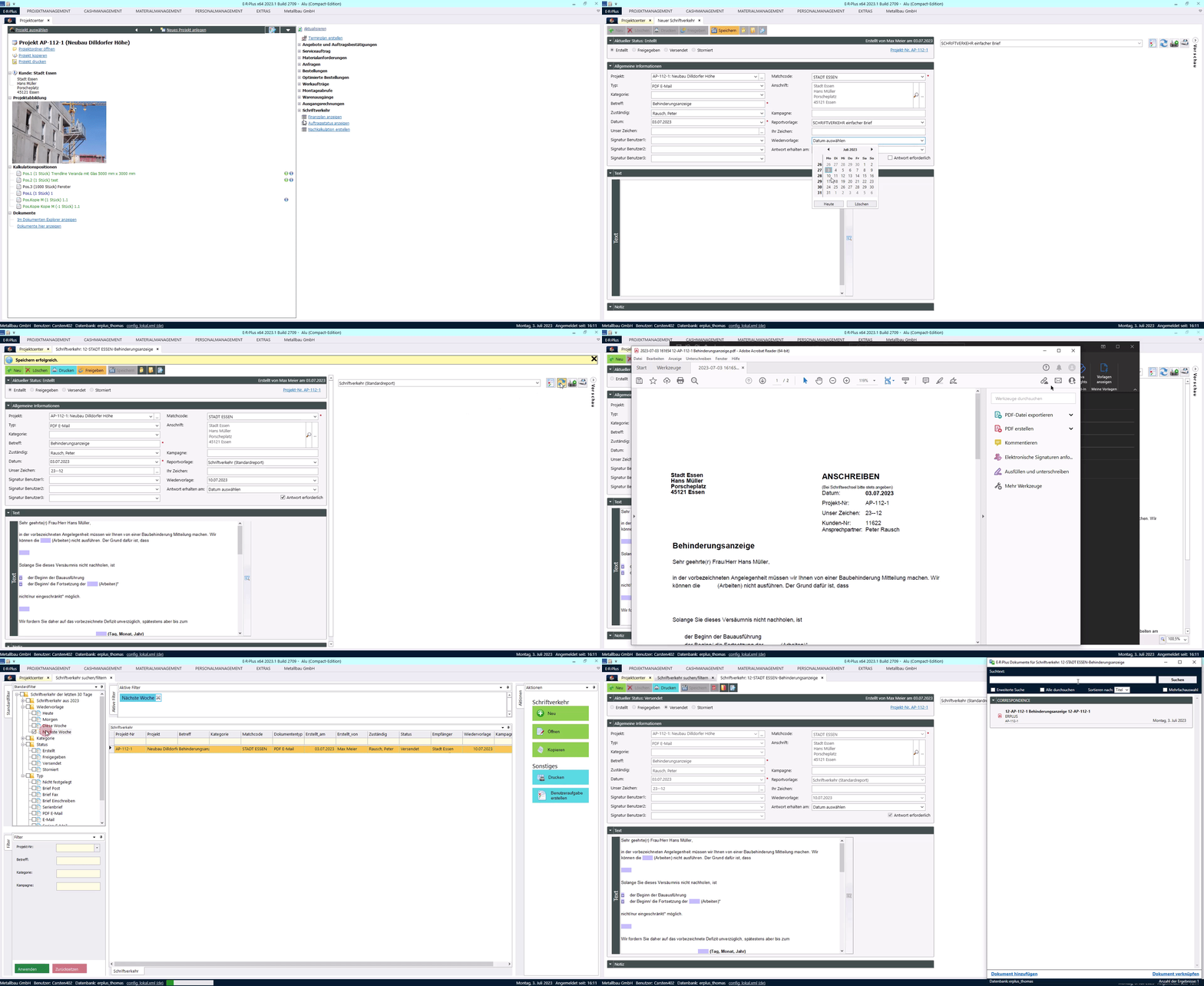
-
- New User Right
The user right “Correspondence” has been added for editing correspondences, which is set to “Access
Denied” by default. - Preview in Editing Form
For correspondence, a new default report has been added, which can be previewed in the right-hand
section of the editing form, including the print preview.
In combination with the new PDF module (see below):
The print preview is displayed in the PDF editor. This requires logging in with an online user and
accessibility to the ERPlusServer. When updating the preview for the first time, a document is created,
which is linked to both the correspondence and the business transaction.
If a document is linked to correspondence, it can be opened through a call in the Document Explorer. - Setting for Generating “Our Reference”
In the general settings, an entry for “Our Reference” can be defined under “Correspondence,” composed of
free text inputs and placeholders. “Our Reference” can be generated from these entries using the
[…]-button in the correspondence. The placeholders (e.g. Project No.) are filled with context-specific
values. - Text Modules for Correspondence
Text modules can be created through settings or the text field in correspondence.
When creating a text module through settings, the text group “Correspondence” with the text type “Both”
must be selected.
When creating a text module through the editing form, fields inserted in the text, such as “Our
Reference,” can be copied and transferred to the text module. When using such a text module, the
placeholders for “Our Reference” are updated according to the context. - Sending Approved Correspondence
An approved correspondence can be sent through the editing form. Depending on the selected type, the
processes differ as follows:
Type PDF-Email:
– Based on the stored report, a PDF is created and attached to an email draft.
– The text of the email remains empty.
– The recipient is pre-filled with the contact person’s email address.
Type Email:
– The content from the text field of the correspondence is inserted into the email.
– The recipient is pre-filled with the contact person’s email address.
– Please note: Depending on the List&Label email provider, the behavior may differ in terms of
formatting and images!
For all other types, the print dialog is opened. - My E·R·Plus Reminder
A date for follow-up can be set for correspondence.
In order for correspondence to appear on the home screen under “Next 7 Days,” the project reminder
“Correspondence Follow-up” must be set in My E·R·Plus settings.
Please note that in the next 7 days, only project-related correspondences can be displayed.
Correspondences without project reference can be filtered using the “Follow-up” filter in the
search/filter form.
- New User Right
- New PDF Editor Module (BETA Version)
Available as a paid add-on module
The new PDF Editor allows editing, annotating, and signing PDFs. Documents stored in the E·R·Plus Document
Management can be directly edited using it.
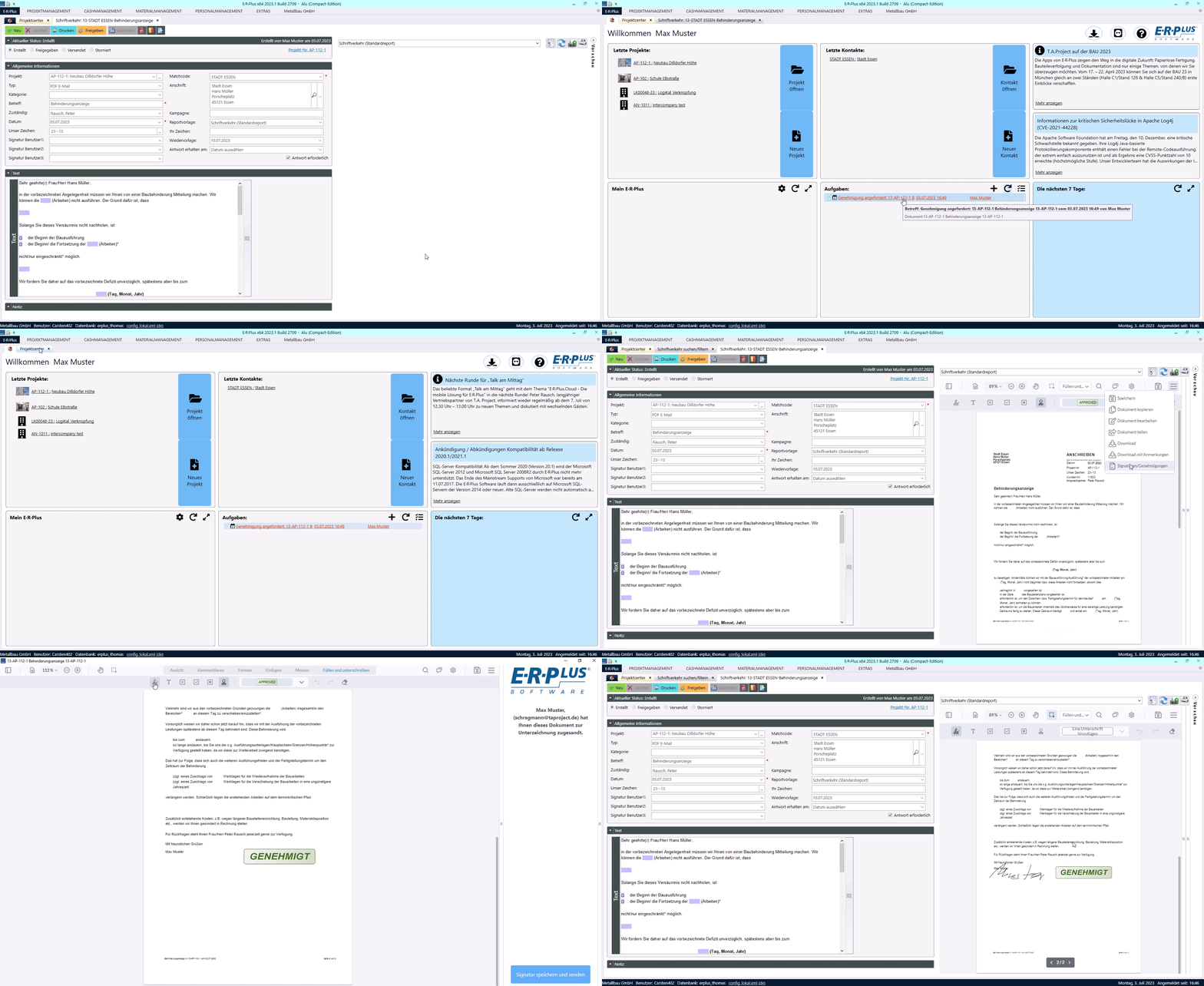
-
- Annotate PDF files, including text highlighting, freehand drawing, comments, shapes, and more. Create
custom annotations for unique workflows. - Allow users to fill out and submit PDF forms in your viewer. Sign PDFs with hand-drawn annotations and
save signatures for signing multiple pages. - Inviteother users to approve or sign a document (simple signature – no qualified signatures)
- Prerequisite for using the PDF module is an ERPlusServer configured over HTTPS and the subdomain
“*.erplusserver.net.” An E·R·Plus online user is required to log in to the service.
- Annotate PDF files, including text highlighting, freehand drawing, comments, shapes, and more. Create
Note: Currently, PDF files cannot yet be created with annotations and signatures.
- Standardization of Payment Methods
The same list of payment methods is now used for selecting payment methods in projects, contacts, maintenance
contracts, and incoming invoices. The payment methods “Direct Debit” and “Debit Entry” have been merged and will
be listed under “Debit Entry” in the future, while the payment methods “Bank Transfer” and “Online Bank
Transfer” will be listed under “SEPA Bank Transfer.”
Additionally, the list has been expanded with the following payment methods:
-
- Prepayment
- Standing Order
- Cash on Delivery
- Click and Buy
- Amazon Payments
Outgoing Invoices
Only for Swiss culture setting:
- The “Incoming Account” field is now a mandatory field.
- The year digits in QR and SCOR references have been reduced to 2 characters (2023 = 23).
Outgoing Invoices – XInvoice/ZUGFeRD Export V2
- Project Number and Project Name are included in the generated XML file
- If a note is attached to the invoice, it will be included in the generated XML file.
Note for XInvoices to Deutsche Bahn:
To correctly include the “CS Order” and “Railway Location” details, these must be manually written in the
invoice note.

- Export now considers different tax rates in outgoing invoices.
Note: This also applies to ZUGFeRD Export V1. - The deduction types “Construction Insurance gross,” “Cost Contribution gross,” “Security gross,” and “Free
Deduction gross” can be considered in ZUGFeRD Export V2. The gross deductions are always written to the XML file
with a tax rate of 0%. - Documents can now be marked as “Invoice Supporting Document.”
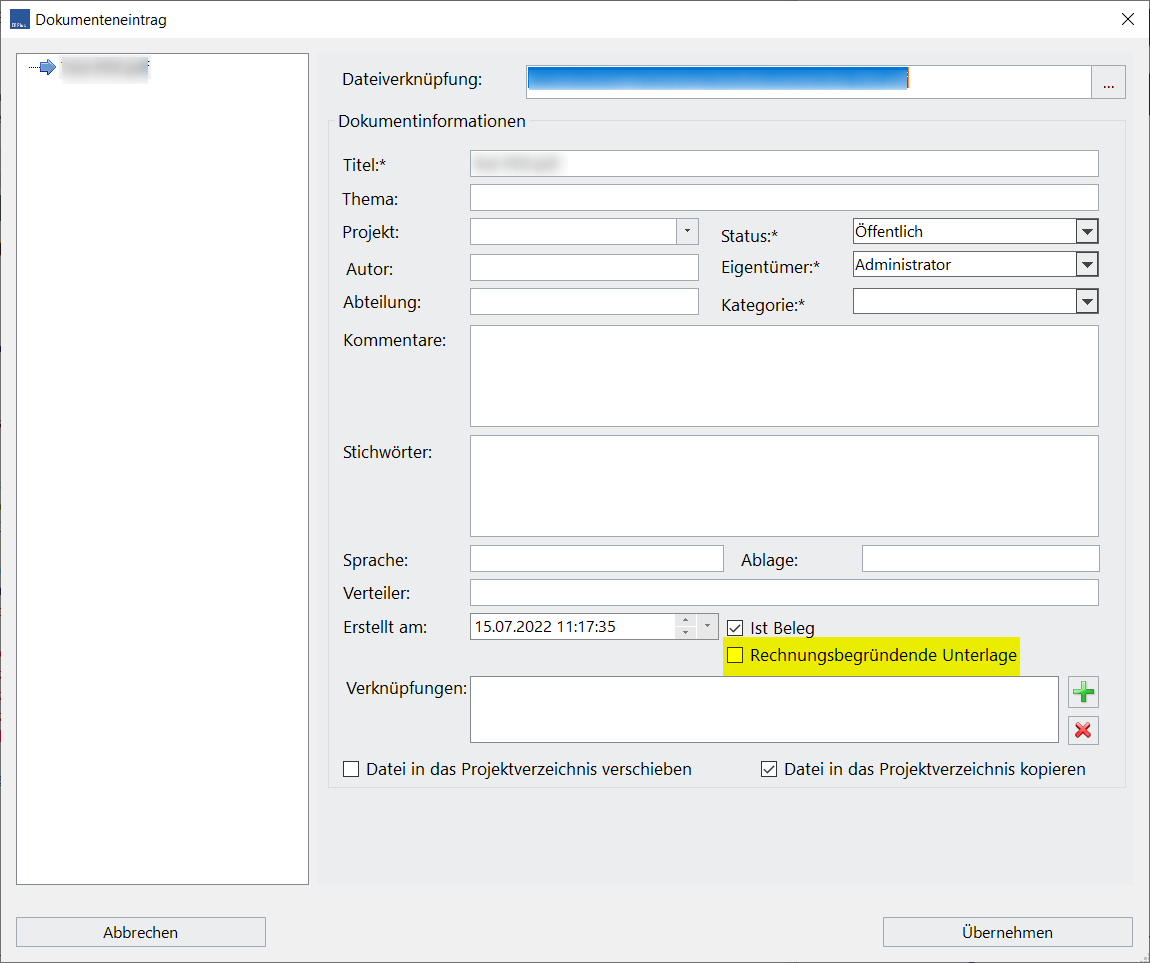
When exporting “XInvoice/ZUGFeRD V2,” documents associated with the invoice will be automatically included in
the XML file as a Base64-encoded string. It should be noted that invoice supporting documents, according to
XInvoice standards, must be one of the following file types:
.pdf – .png – .jpg – .csv – .xlsx – .ods
Additionally, only public documents are included in the XML file.
Incoming Invoices
- When recording an incoming invoice, the payment method is pre-filled from the creditor’s master data, if
available. - For ZUGFeRD V2/X-Invoice import, the creditor’s payment method is used if no payment method is specified in the
ZUGFeRD file. - For substantively unchecked incoming invoices, a setting has been added to My E·R·Plus Reminders.
Only for Swiss culture setting:
- The fields Payable by, Payable to, Payment Information, Payment Reference Number, and QR-IBAN, which are filled
when reading a QR invoice, can now be edited until the invoice is released.
Settings/Payment Terms
- In the payment terms, a kind of mathematical formula can now be specified in the “Calculation” column, through
which the due date for the payment term is calculated. The setting options can be found in the following wiki
article: Payment Term Definition Using the Calculation Field
Hazardous Substance Management
- In the search/filter form, the “Category” column can be optionally displayed, showing the category label from
the article master data.
Configuration
- In the E·R·Plus configuration file, a location can now be specified under “Device – Location”:
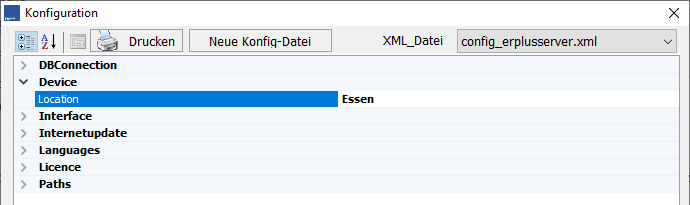
The entered location will be considered in the Material Request
during location checks.
LogiKal Interface
- LogiKal Article Data Import
Articles and profiles in the LogiKal transfer file with item status “6” (= “Reactivated Article”) will now be
assigned the status “Discontinued Article” during the article data import in E·R·Plus. The “Discontinued
Article” status will be set or updated when:
– Articles are intended to be overwritten
– the “Discontinued Article” field is selected in the custom selection
– new articles are added.
Please note that this function cannot currently be used with LogiKal version 12!
Material Request
- If a location is configured in the settings, only stock levels whose location starts with the name of the
location will be displayed in the stock check. Material from pending deliveries will not be further separated.
Material Status
- The columns “Ordered Quantity” and “Delivered Quantity” are now specified not in the requested quantity unit,
but in the quantity unit from the order.
Exception: If articles were ordered as packaging unit (VE articles), the quantities will be displayed in the
packaging unit.
My E·R·Plus
- In the settings for “My E·R·Plus” reminders, the option “Substantively Unchecked Incoming Invoices” has been
added.
The option is only available if the general setting “Automatic Substantive Invoice Approval” is not set.
When the option “Substantively Unchecked Incoming Invoices” is set, a reminder will be displayed to the user on
the home screen for unreleased invoices that the user is designated as the substantive invoice verifier for.
Clicking on the notice will open the incoming invoice book, where only the affected invoices are pre-filtered.
Assembly Calls
- In the selection list “Material Import” for inserting items from material requests, the columns “Note2,” “from
Department,” and “to Department” have been added. The 3 new columns will be considered in search entries through
the filter bar.
Post-Calculation
- For the post-calculation structure, the variables {Construction Insurance} and {Cost Contribution} have been
added.
Both variables can be subtracted, for example, from the value {Revenue}, thus reducing the actual revenue in the
actual column of the post-calculation. For further details, refer to the Wiki article “Post-Calculation: Consideration of Construction Insurance and Cost Contribution in Revenues.” - For the identification of pre-disposed material, the column “PreDisposition” has been added.
Please note that the column is only available when the consumption-oriented post-calculation method is used.
Employee Attendance
- In the “Attendance” tab, the columns “Project No” and “Project Name” have been added, displaying the first
booked task of the day. - Through the “Additional Costs” tab, the “Edit Additional Costs” form can be accessed, allowing for the addition
or viewing of receipts, for example. Additional costs with receipts marked as “Checked” are displayed in green font color.
Employee Shift Planning
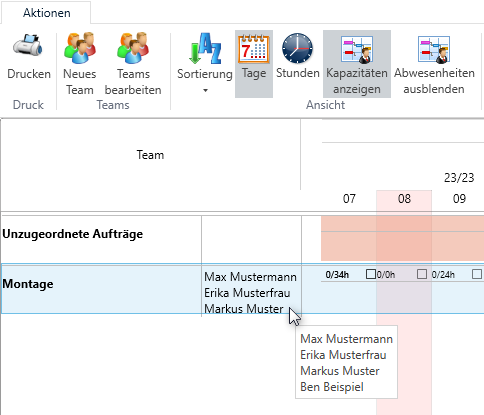
- To the right of the team name, employees in the team are now displayed. If all members cannot be displayed due
to space constraints, a complete list can be viewed through a tooltip (mouse-over).
- In the filter for appointment schedule positions, machine-based cost specifications can now be selected.
- Orders cannot be assigned to a team if the order’s timeframe is outside the team’s validity period.
Additionally, the team’s validity period is displayed below the team name.
Employee Additional Costs
- In the “Edit Employee Additional Costs” input form, receipts can be added, which are stored in the document
management system with a link to the additional cost entry. To add a receipt, the user right “Documents” with at
least “Read, Write+Add New” permissions is required.
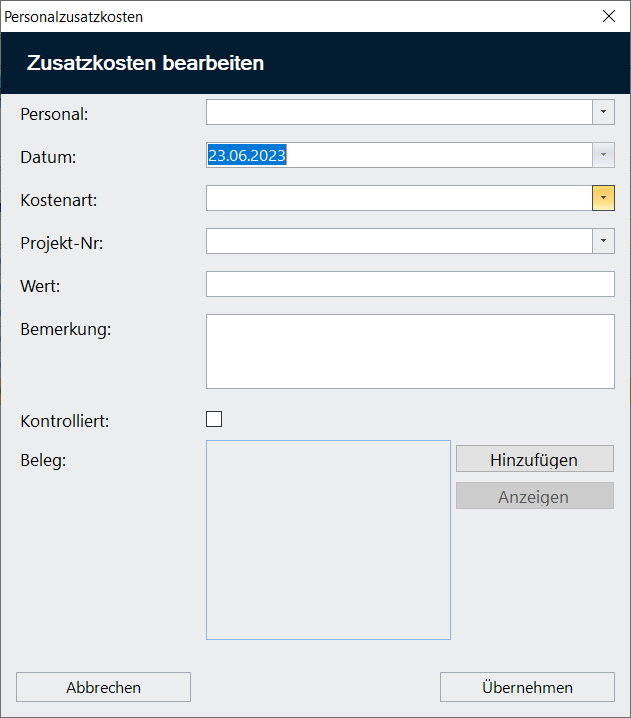
- In the search/filter form, the columns “Number of Receipts” and “Checked” can be optionally displayed.
Project Management
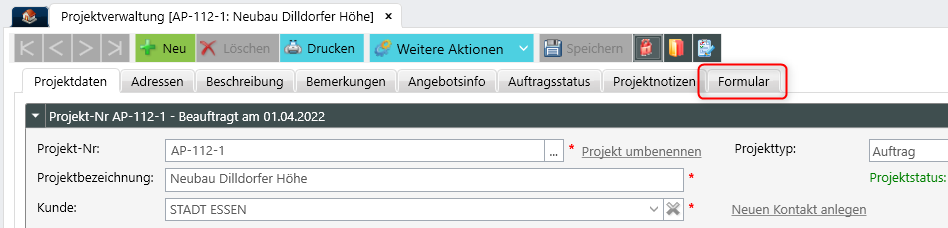
- A tab for form templates has been added to the project management. All templates with ObjectType “Project” or
“All” can be selected here.
Incoming Invoice Journal
- The default filter “Substantive Unchecked Invoices” has been added. This shows all invoices that do not yet have
substantive approval.
The filter is only displayed if the general setting “Automatic Substantive Invoice Approval” is not set.
Please note that no filtering is performed based on the current user. Filtering by the substantive invoice
verifier can be done through the “Substantive Invoice Verifier” column, which can be optionally displayed.
Quick Invoice Entry
- If the selected contact has a payment method stored, it will be pre-filled upon selecting the contact.
Only for Swiss culture setting:
- The fields Payable by, Payable to, Payment Information, Payment Reference Number, and QR-IBAN, which are filled
when reading a QR invoice, can now be edited.
SchüCal Interface
- Approval for SchüCal version 2023 R2
- For creating execution variants in SchüCal, the following two function calls are now available, both in the
Project Center and in estimate:- in SchüCal from Quote Position
Functions like the previous “in SchüCal” function and creates the variant as a copy of the quote
position. - in SchüCal with Selection
The user can choose whether the variant should be created based on an existing position or a template.
- in SchüCal from Quote Position
SEPA
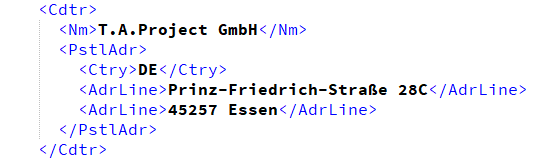
- During SEPA file export, the recipient’s address is now included in the XML file independent of the set language
and culture. Generally, the address will be included in unstructured form.
For Swiss language settings, it will be included in structured form. Exception: For SEPA transfers in Euro
currency, according to SIX specifications, it is recommended to include the address in an unstructured manner.- Unstructured address:
- Structured address:
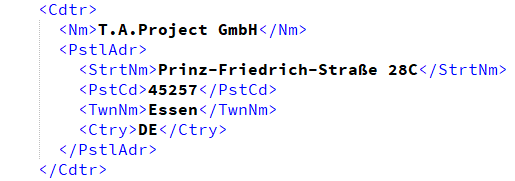
- Unstructured address:
Estimate
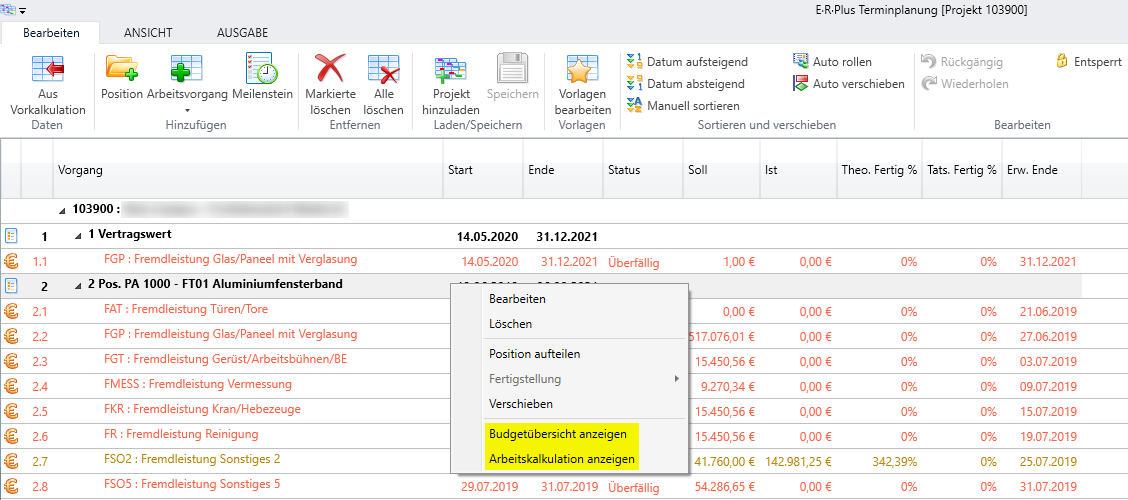
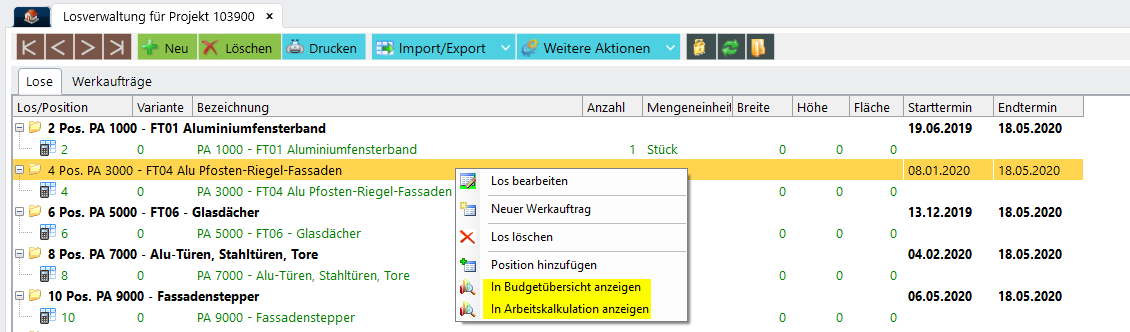
- To display the positions linked to a schedule position or a lot in the work calculation or budget overview,
corresponding function calls have been added to the schedule planning and lot management.
Factory Orders
- For the function “New Material Request for Surface Treatment,” the information for the factory order position is
now transferred to the created material request position. This information can be viewed at various points:- In the material request, the column “WAT Pos.” can be optionally displayed.
- If a surface order is created from the material request, the column “WAT Pos. from Mat.” can be
displayed in the surface positions. - If a goods issue is created from the material request, the column “WAT Pos. from Mat.” can be displayed
in the goods issue positions.
Additionally, the factory order position can be displayed in the “Wat Pos.” column, directly linking to the
goods issue position. This applies when a delivery note for positions is created from a factory order.
ERPlusServer
- The ObjectType “Project” has been added for form templates.
The placeholders that can be set to capture project data have been added to the list of placeholder values.
E·R·Plus Apps (Build 9530)
TimeAppV2
- If the setting “Disable Numeric Validation” is enabled, when entering an employee or ID number, the search will
always be performed after the ID number. This exception applies to group bookings (comma-separated input).
Payroll Report Entry
- The setting “Payroll Reports – Enter Only Additional Costs” has been added.
Once this setting is activated, only the “Entry” and “Additional Costs” steps will be displayed in the payroll
report entry. - For employee additional costs, receipts can be added.
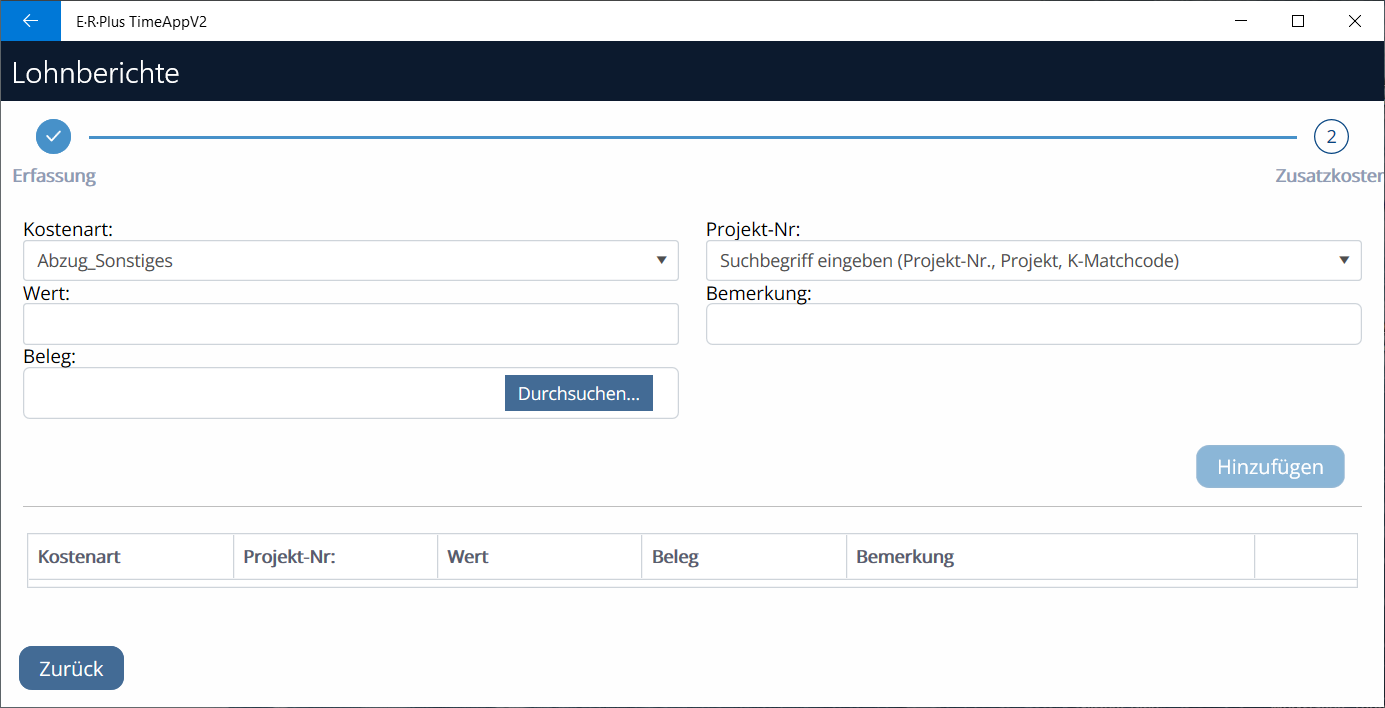
In the Android app, receipts can be captured using the camera or selected from the gallery. Please note that the
app permissions for “Camera” and “Files and Media” must be granted for this purpose. In the UWP app, the Windows
file selection dialog opens. In both cases, adding image files is supported. However, it’s important to note that receipts cannot be added or downloaded for existing records.
Monthly Overview
- A dropdown to select the displayed month has been added to the monthly overview. Besides the current
month, the last 6 or next 6 months can be chosen.
Factory Order App
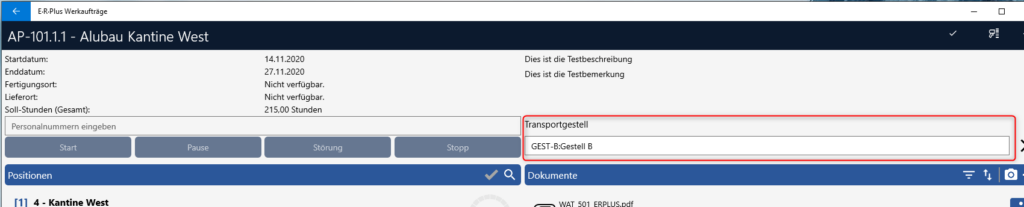
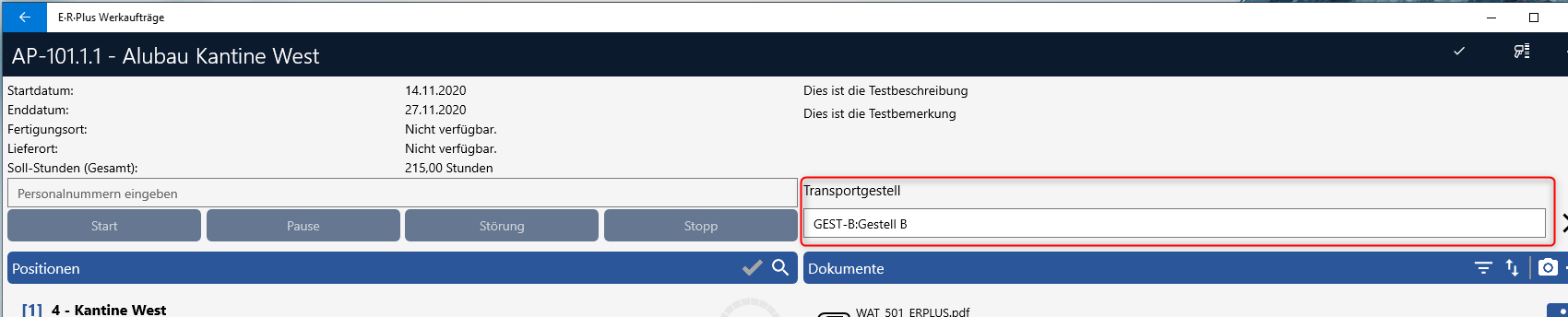
- In the factory order, the “Transport Rack” field has been added. The transport rack can be selected to be
used for transporting between or to the next station. When the factory order is completed, the transport
rack is removed from the factory order.
Reporting
General
- Special Fonts
If special fonts are used, they must be installed on all clients using E·R·Plus. If at any point a
computer cannot access this font, it will be replaced with “Arial” in most areas.
Item Management
- Structural Bill of Materials
The length of the item is now displayed.
Outgoing Invoices
- The contents “thereof from open progress payments” and “thereof from current invoice” are only shown if
open progress payments are present.
Outgoing Invoices with Swiss QR Payment Information / Swiss QR Invoice
- Additional information in the payment part and Swiss QR code has been extended with contents following
the S1 syntax for accounting. Contact names have been limited to 70 characters in accordance with Swiss
Federal Council guidelines. If combined contact names exceed 70 characters, they will be truncated
starting from the 71st character.
EDI Orders
- EDI Order for Orders / Order with Surface Specification
Instead of the project number, the contract number is now printed under the term “Object Conditions”.
The contract number is obtained from the vendor payment terms.
Project Management
- Project Sheet for Workshop with Barcode
The “Position Image” print option has been added.
Correspondence
- A suitable standard report has been added for the new “Correspondence” module.
Estimate
-
-
- 2b. Calculation Summary (Highlighted Positions)
Percentage rates for surcharges, overhead costs, and profit are now calculated weighted if
different percentage rates are used in the highlighted positions. This applies to estimate
levels 1 and 2.
- 2b. Calculation Summary (Highlighted Positions)
-